# Custom Scheduling For Monitors

Take control of your monitoring frequency with flexible scheduling options that align with your data update patterns and business requirements.

{% hint style="info" %}
**Applies to:** Scheduled monitor mode only. On-demand monitors run manually when needed.
{% endhint %}

## Scheduling Strategy Guide

Choose the right frequency based on your data characteristics and monitoring needs:

### Quick Selection Guide

| **Frequency**      | **Best For**       | **Use Cases**                            | **Resource Impact** |
| ------------------ | ------------------ | ---------------------------------------- | ------------------- |
| **Every 1 Hour**   | Real-time systems  | Live dashboards, streaming data          | High                |
| **Every 3 Hours**  | Active pipelines   | ETL processes, API feeds                 | Medium-High         |
| **Every 6 Hours**  | Regular updates    | Business reporting, batch jobs           | Medium              |
| **Every 12 Hours** | Daily processes    | Nightly ETL, twice-daily updates         | Low-Medium          |
| **Daily**          | Standard reporting | Business reports, compliance checks      | Low                 |
| **Weekly**         | Periodic data      | Reference data, slow-changing dimensions | Very Low            |
| **Monthly**        | Historical data    | Archive validation, trend analysis       | Minimal             |

***

## Frequency Options

### High-Frequency Monitoring (1-6 Hours)

**Every 1 Hour** ⚡

* **Ideal for**: Real-time dashboards, streaming data, critical business metrics
* **Consider**: High resource usage, potential for alert fatigue
* **Best practices**: Use for truly time-sensitive data only

**Every 3 Hours** 🔄

* **Ideal for**: Active ETL pipelines, frequent API updates
* **Consider**: Good balance of coverage and resource efficiency
* **Best practices**: Monitor business hours vs. off-hours patterns

**Every 6 Hours** ⏰

* **Ideal for**: Regular batch processes, scheduled data loads
* **Consider**: Covers most business scenarios without overwhelming
* **Best practices**: Align with your ETL schedule timing

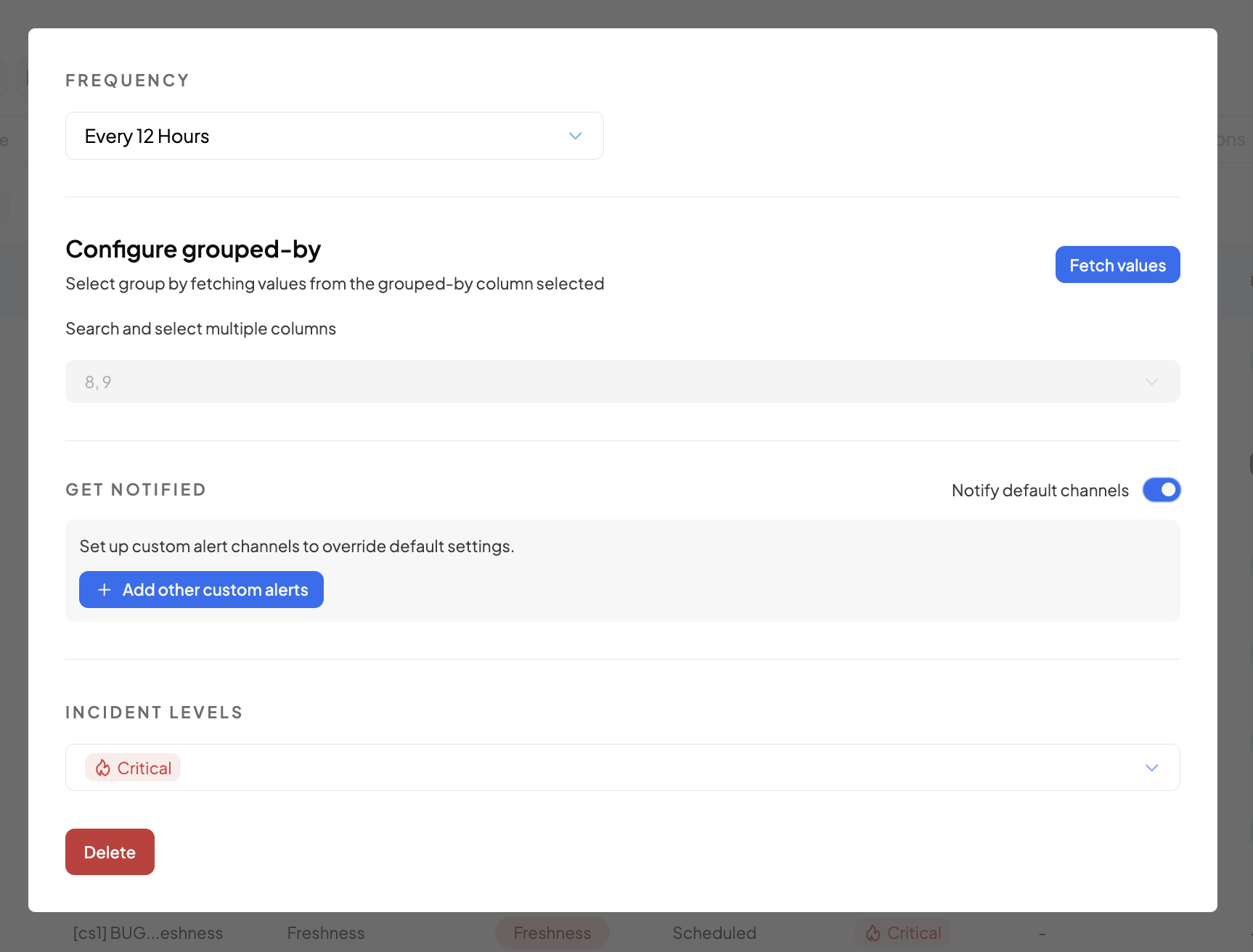
### Standard Monitoring (12 Hours)

**Every 12 Hours** 📊

* **Ideal for**: Daily business processes, twice-daily updates
* **Consider**: Catches issues within business day cycles
* **Best practices**: Schedule to align with business operations

<figure><img src="https://1779874722-files.gitbook.io/~/files/v0/b/gitbook-x-prod.appspot.com/o/spaces%2FTw0qpCVzfrIXqS4FEg4T%2Fuploads%2Fgit-blob-624a82a460dd2732136d1789c2e7bc5233113f81%2Fimage.png?alt=media" alt=""><figcaption></figcaption></figure>

***

## Advanced Scheduling Options

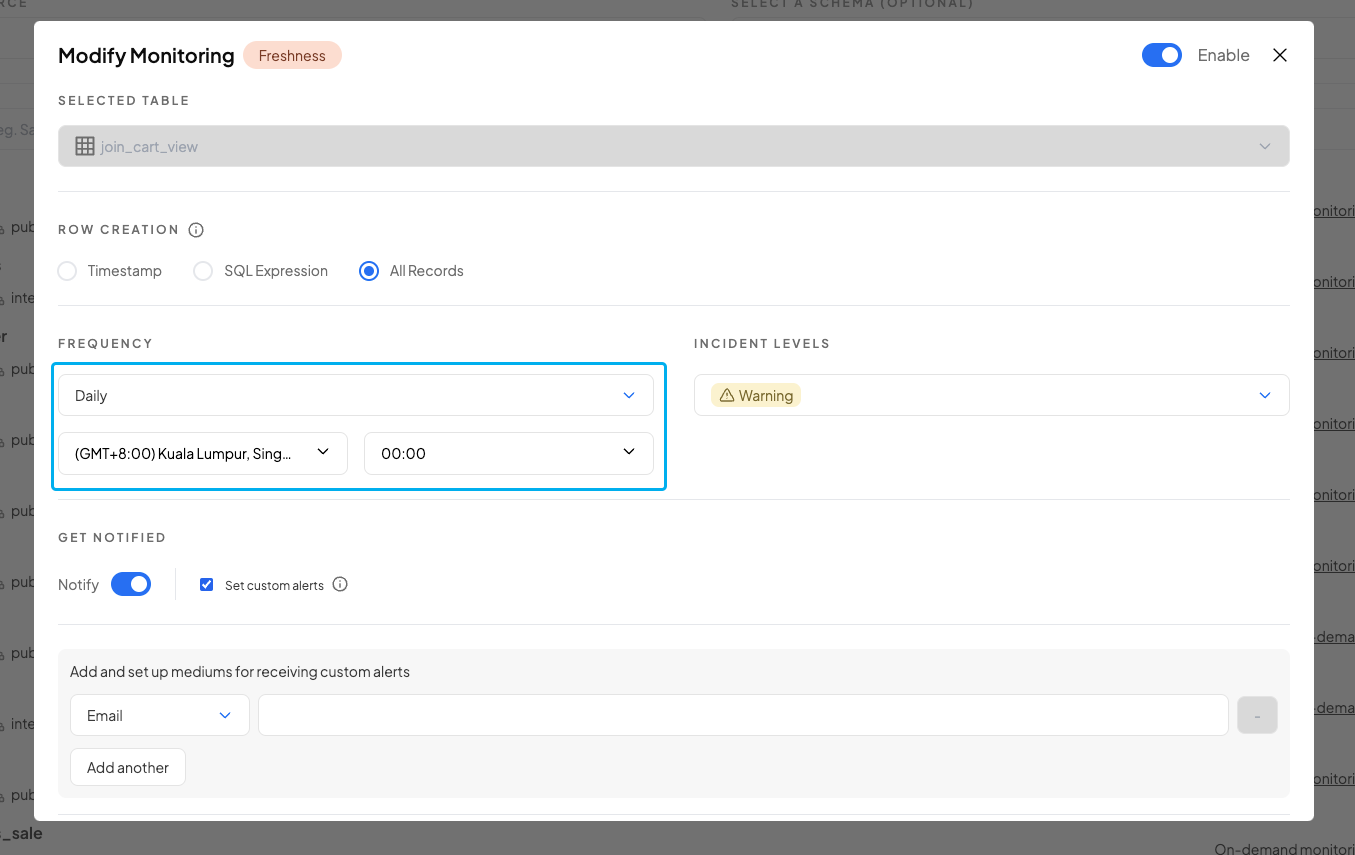
### Daily Scheduling 📅

For precise control over daily monitoring:

**Configuration Options:**

* **Timezone Selection**: Align with your business timezone
* **Specific Time**: Set exact execution time (24-hour format)
* **Business Day Alignment**: Consider peak vs. off-hours monitoring

**Best Practices:**

* Schedule after ETL completion times
* Avoid peak business hours for large table scans
* Consider data team working hours for incident response

<figure><img src="https://1779874722-files.gitbook.io/~/files/v0/b/gitbook-x-prod.appspot.com/o/spaces%2FTw0qpCVzfrIXqS4FEg4T%2Fuploads%2Fgit-blob-23ee1da440dee1d926bbe2c4e632f0c081508a36%2Fimage.png?alt=media" alt=""><figcaption></figcaption></figure>

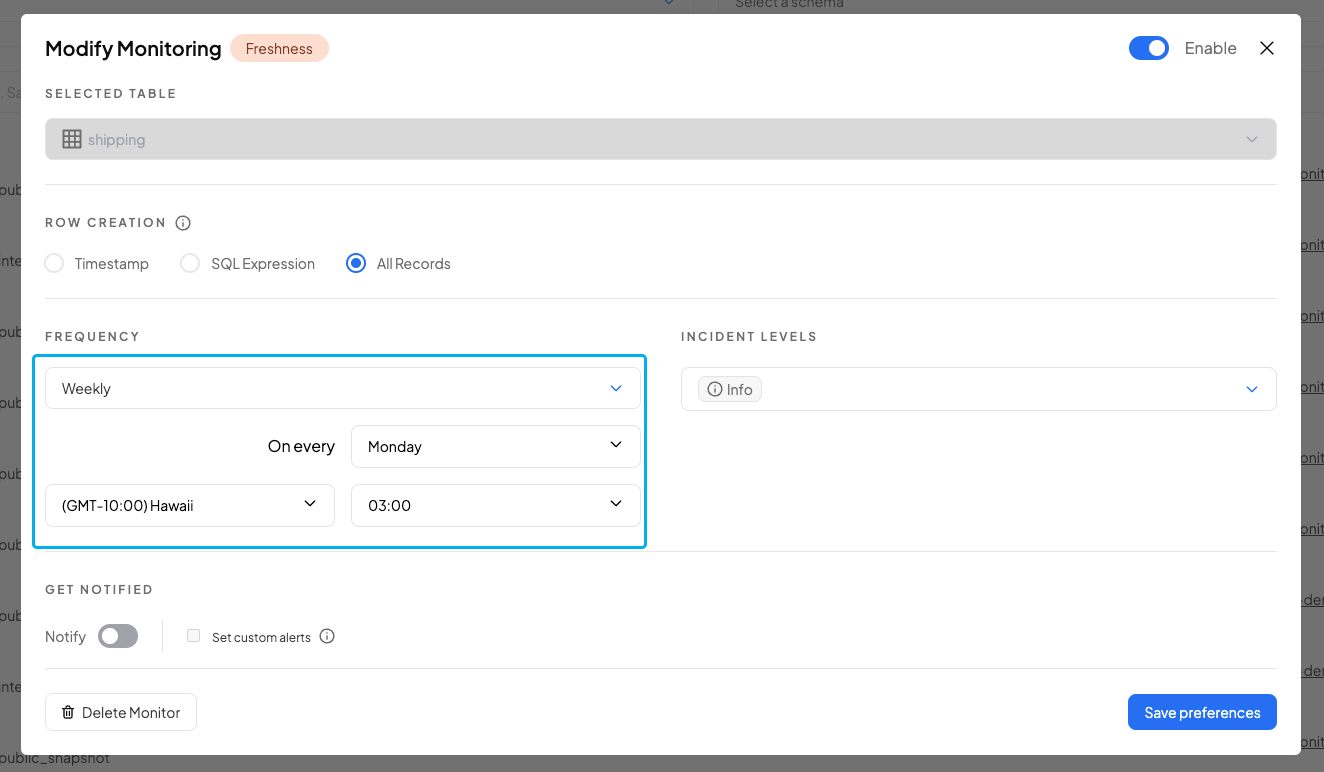
### Weekly Scheduling 📋

**Configuration Options:**

* **Day Selection**: Choose specific day of the week
* **Timezone**: Business timezone alignment
* **Time**: Specific execution time

**Ideal Use Cases:**

* Reference data validation
* Weekly report quality checks
* Slow-changing dimension monitoring
* Compliance reporting

<figure><img src="https://1779874722-files.gitbook.io/~/files/v0/b/gitbook-x-prod.appspot.com/o/spaces%2FTw0qpCVzfrIXqS4FEg4T%2Fuploads%2Fgit-blob-e16162ebd50c45c813f5c5d58d9bd64e29d9af96%2Fimage.png?alt=media" alt=""><figcaption></figcaption></figure>

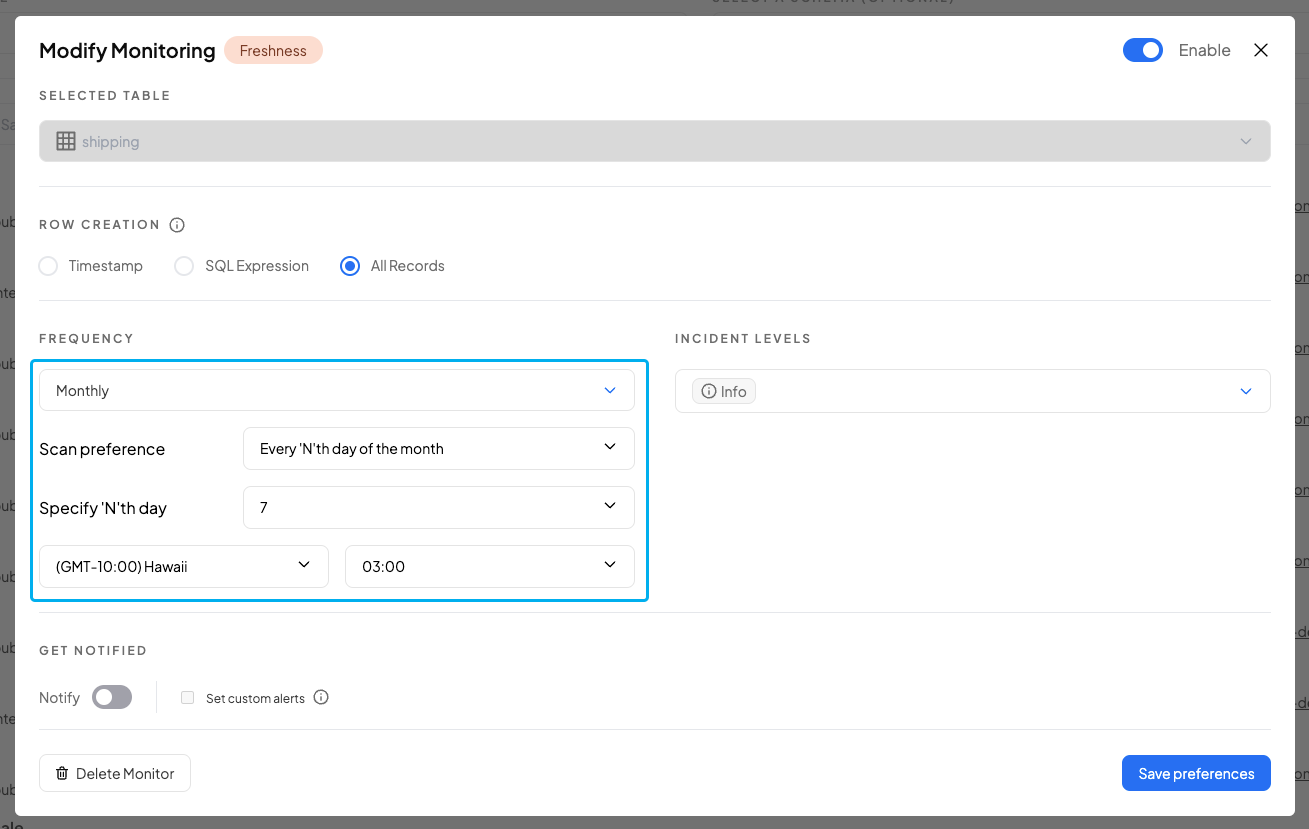
### Monthly Scheduling 📆

**Configuration Options:**

* **Day Selection**:
  * Every "N"th day of the month (up to 28th)
  * Every last day of the month (for 30th/31st requirements)
* **Timezone**: Business alignment
* **Time**: Specific execution time

**Ideal Use Cases:**

* Month-end financial data
* Periodic compliance checks
* Historical data validation
* Archive integrity monitoring

<figure><img src="https://1779874722-files.gitbook.io/~/files/v0/b/gitbook-x-prod.appspot.com/o/spaces%2FTw0qpCVzfrIXqS4FEg4T%2Fuploads%2Fgit-blob-2339d07a8bbdddd4cfc1ba5053baf80875c91daf%2Fimage.png?alt=media" alt=""><figcaption></figcaption></figure>

***

## Setup Process

### Accessing Custom Scheduling

1. **Navigate** to Config > Create
2. **Select** your monitor type (Freshness, Volume, Field Health, Custom SQL)
3. **Choose** "Scheduled" monitor mode
4. **Configure** frequency in the setup form

### Configuration Steps

1. **Select Base Frequency** from the available options
2. **Configure Details** (for Daily/Weekly/Monthly):
   * Set timezone
   * Choose specific day (Weekly/Monthly)
   * Set execution time
3. **Validate Settings** against your data patterns
4. **Save Configuration** and monitor performance

***

## Best Practices & Optimization

### 🎯 Frequency Selection Strategy

**Start Conservative:**

1. Begin with lower frequencies (Daily/Weekly)
2. Monitor alert patterns and false positives
3. Increase frequency only if needed for timely detection

**Match Data Patterns:**

* **Hourly data updates** → Every 1-3 hours monitoring
* **Daily ETL jobs** → Daily monitoring (post-job completion)
* **Weekly batch loads** → Weekly monitoring
* **Monthly reporting** → Monthly monitoring

### ⚡ Performance Considerations

**Resource Management:**

* High-frequency monitoring increases compute costs
* Balance monitoring coverage with resource efficiency
* Use grouped-by monitoring for dimension-specific needs

**Alert Management:**

* Higher frequency = more potential alerts
* Ensure alert channels can handle volume
* Consider incident severity levels appropriately

***

## Related Topics

{% content-ref url="available-monitor-modes" %}
[available-monitor-modes](https://docs.decube.io/data-quality/monitor-configuration-settings/available-monitor-modes)
{% endcontent-ref %}

{% content-ref url="../incident-model-feedback" %}
[incident-model-feedback](https://docs.decube.io/data-quality/incident-model-feedback)
{% endcontent-ref %}

**Need Help?** Contact <support@decube.io> for guidance on optimal scheduling strategies for your specific data architecture.